Scenario: You want to Delete all the Subsites within a Site Collection. if you are not a Java script/CSom coder or Powershell scriptor this may help you.
Solution: I will show you a simple Microsoft Flow logic to delete the subsites further you can add conditions for specific subsites and or start approval flows as well for the same and perform your actions as per your requirement.
Overall Successfully running Flow


This is the basic logic of deleting the subsites, you can further customize it as per your requirement if you need to send an approval mail to the owner of the subsite or check if there are nested subsites etc...
Solution: I will show you a simple Microsoft Flow logic to delete the subsites further you can add conditions for specific subsites and or start approval flows as well for the same and perform your actions as per your requirement.
Overall Successfully running Flow

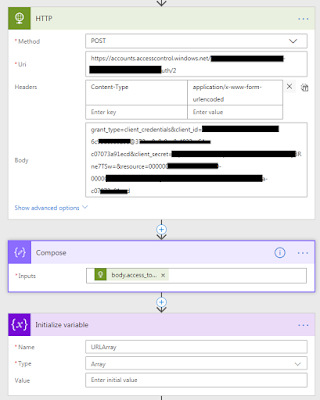
1. First Step will be to get the Access Token for HTTP Request to run REST API calls. I have written a blog on this. If you need me to write an article on Getting Access Token, please leave it in the comments below.
2. from the HTTP POST call, we need to store only the Access Token, so using Compose action, enter [ "@outputs('HTTP').body.access_token" ] (without box brackets)
3. I am initializing a Global Variable as Array to Store the URL of the subsite, which we will need in the last step of Deleting the subsite.

4. Now you need to again call HTTP method GET for the site collection and obtain all the subsites under it "/_api/web/webs"
5. Set the Global Array variable to have the results of all subsites obtained in array. [ "@outputs('HTTP_2').body.d.results" ] (without box brackets)
6. Add 'Apply to Each' and insert the global variable (as the input)
7. Add 3rd HTTP action to finally delete the subsites. Use "Delete" as Method. URI will be as an expression item()?['URL'] and without adding any space append ' /_api/web '
Pls. Note:- This will delete the subsites permanently, they will NOT go to 1st stage Recycle Bin or 2nd stage or Recycle Bin.

This is the basic logic of deleting the subsites, you can further customize it as per your requirement if you need to send an approval mail to the owner of the subsite or check if there are nested subsites etc...


